Showing posts with label Neat Solutions. Show all posts

A Global Resource Manager for VFP (Part II)

Version: 1.02.00 - last update: Wednesday, September 07, 2009, 00:59:00

Previous ChapterNeat Solutions Home (TOC)Next Chapter   Latest Addition(s) Screen Cast showing 1st alpha release


This thread is all about how to gain full design-time control over VFP’s shared/public resources and more!

Intro

In OffSiteLink Part I of this thread we talked about all kinds of things our Global Resource Manager (GRM) should be up to handle, fast and reliably. There is one thing we didn’t mentioned yet. Okay, I talked about it once, but in a different context. It is the fact that our manager should behave like a “native” part of VFP’s IDE - like the project manager does, for example. In other words, no CLEAR ALL, no CLOSE ALL, no RELEASE ALL or any other VFP direct command should spoil our GRM instance. Our GRM reference variable should last like any VFP “_System” variable.

Utilizing an “Unbreakable” Form

You should read my thread OffSiteLink Unbreakable Objects to better grasp what I’m going to talk about now. Well, our GRM has to be based on a VFP FORM class. Even more, we do need a SCX-based form that is run using the DO FORM syntax. This form will act as our host container. As long as we can guarantee that this form isn’t released we have some kind of secure home for all of our global resources. Before we dive into making the implementation of our GRM bullet-proof, we have to think about how we will manage our global resources internally.

The MY Namespace Object

When I was thinking about how to implement the resource management internally, I remembered a Sedna add-on called “MY Library”. You can download the whole package here OffSiteLink Microsoft Visual FoxPro 9.0 "Sedna" Add-Ons. This download contains six components: VistaDialogs4COM, Upsizing Wizard, Data Explorer, NET4COM, MY for VFP and VS 2005 Extension for VFP. I must admit, I had installed the Sedna add-on long time ago, but never really used it. I don’t know why, maybe it seemed to be of no big help to me. Anyway, today I believe that combining the MY namespace for VFP with our unbreakable host form will bring it to another, much higher, level of usefulness!

Advantages of MY for VFP

The following list shows the most important points

  • Data-driven & fast
  • Extendable arbitrarily
  • Reliable & thoroughly tested
  • Easy to learn & to handle
  • Easy to integrate
  • Runtime- and Design-time support
  • Comprehensive documentation

As you can see, there are a lot of good reasons to utilize the MY namespace tool in our GRM project. While checking the My Namespace classes I came to the conclusion that it would be best to have a MY system variable referring our GRM’s internal engine. Wouldn’t it be nice to have an unbreakable global variable called MY that could be used in any IDE context?

The Global MY Variable

Let’s speculate – there is a native VFP namespace called MY (if you prefer, name it _MY to stay congruent with other system variables). Now, with the help of our unbreakable MY we are able to address e.g. our unbreakable forms collection like so:
My.Forms.Add(_oBrowser) && make current class browser instance unbreakable

Or, let’s add some Win-Api DECLAREs to our “CLEAR ALL protected” declarations like so:
My.WinApi.Add(m.DeclarationExpr) && make declaration CLEAR ALL resistant

If we need to protect a memory variable against a RELEASE ALL, we could do it this way:
My.Memory.Add(m.VarName, m.VarValue) && make variable CLEAR ALL/RELEASE ALL resistant

The cool thing about the MY namespace for VFP is its extendibility. Using the MyBuilder that ships with the project it’s a snap to add someone's own sub-namespace. The only important thing still to solve is how to make a global VFP variable unbreakable. Impossible?  Come on, lets do it…

Global Resource Manager 1st Implementation

To create a first implementation to proof technical feasibility, we have to record what we want to achieve:

  1. Unbreakable host form
  2. Unbreakable global MY reference variable

The 1st part isn’t that difficult (even the 2nd is not insolvable). All we have to do first is to gather all VFP commands that are capable to “kill” our form and/or MY variable. If one of these commands gets issued, we have to be noticed, somehow. Otherwise, our public MY variable might be gone unbeknownst to our GRM internally. The following list shows the most “dangerous” commands:

  • CLEAR ALL
  • CLEAR WINDOWS
  • RELEASE ALL (EXTENDED)
  • CLOSE ALL

As you should know by now, CLEAR ALL and CLEAR WINDOWS can be trapped by our host form. The number one question now is: How can we detect a RELEASE ALL?

Introducing the MY-Proxy

To put it bluntly, the answer is: There’s no way. At least, I didn’t find a native VFP way. Therefore, I came up with the following workaround. Instead of using a simple/single global variable, I’m using an object. I named it the “MY-proxy”. The global MY variable still exists. But, instead of holding a direct object reference to our GMR host form (more exact: a reference to our GRM’s internal MY-engine), our global MY variable stores a reference to an independent CUSTOM-based object (the MY-proxy)! The MY-proxy class implements a THIS_ACCESS method that redirects any access (to MY) directly to our GRM’s internal implementation. Thus, the MY variable looks like being a direct reference to the Global Resource Manager! Now, while doing a RELEASE MY, the proxy-object’s DESTROY()  gets raised. That’s of course THE EVENT we’ve bound to from within our GRM. In other words: As soon as our MY-proxy gets destroyed, our “monitor”-event is raised and we will create another new MY-Proxy instantaneously. That’s all we have to do to simulate some unbreakable global variable in VFP, right?

How to Trap a CLOSE ALL

Object’s persistence isn’t threatened by a CLOSE ALL command, fortunately. But, CLOSE ALL is able to close tables, editor sessions, designer instances and more. So, if we want to keep any of these alive (protecting them against being closed by a CLOSE ALL) we have to get noticed when an interactive CLOSE event occurs, too.

I wrote a short article about how to monitor the life-cycle of any VFP class/form designer instance. You can read about that OffSiteLink here. Issuing a CLOSE ALL will certainly close all class designer sessions. Therefore, we can create one, make it “invisible” to VFP’s IDE and just start to monitor its existence. If if gets destroyed this can only be done by a CLOSE ALL – Voila, there it is, our CLOSE ALL “event”!

No idea how to make a class designer instance invisible/inaccessible to VFP’s IDE ? Read ahead…

How to Disguise a VFP Designer Session

Creating a form, using the form designer, fits best in our scenario (we don’t have to select a class library).

*\\ we need Foxtools.fll
LOCAL cFormName AS STRING, nHWND AS Integer
LOCAL ARRAY laSel[1]
*\\ we need the forms object reference later in the game to "bind" to.
PUBLIC goForm AS Form
*\\ make form name unique and remember it! 
cFormName = LOWER(SYS(2015))
*\\ create the form designer instance CREATE FORM (m.cFormName) NOWAIT *\\ get VFP’s internal Win-handle nHWND = _WFINDTITL("Form Designer - " + m.cFormName + ".scx") *\\ get VFP's object reference to the form inside the form designer = ASELOBJ(laSel, 3) goForm = laSel[1] *\\ Hide the whole designer session _WHIDE(m.nHWND) *\\ finally, drop VFP’s window menu entry by clearing *\\ our designer window’s caption! _WSetTitle(nHWND, "") *//

The above line containing the SYS(2015) was driving me nuts lately! During my interactive testing (using the command window only) I was using the fixed name “test” for my new form – always typing lower case letters. Then I wrote the little proggy above using SYS(2015) without  lowering its outcome. I never noticed that VFP always applies a LOWER() to the new form’s scx filename that gets appended to the designer caption after the leading “Form Designer – “ part. Did you? Because _WINDTITL() does a case sensitive search my program never found the newly created form designer window, which finally caused an exception doing the _WHIDE() and _WSETTITLE() Foxtools calls. Since I wrapped the SYS(2015) with a LOWER() the whole thing runs as expected.

In the little demo program I created a public <goForm> variable. In our GRM’s production environment we will take a local reference and store it to an _ASSIGN() decorated property instead – like described in my previous posting. Now, if someone issues a CLOSE ALL VFP will drop the “invisible” form designer without confirmation, which will cause storage of the NULL value to our property and firing our  _Assign() event!

VFP’s Start-Up Sequence

Finally we have to reassure that out GRM is the first object that gets instantiated. Therefore, its good to be aware of VFP’s start-up sequence so that we can hook in our little tool at the very first position!

While starting, VFP executes up to three different programs/commands in the following sequence :

  1. _Startup
  2. Command
  3. _Shell

We can pass in a CONFIG file reference during VFP’s start (or just have a default config.fpw file in VFP’s home directory). The  _STARTUP = <startup_program_file> entry inside the config.fpw is read by VFP and the startup program is executed. BTW: Be aware that there is another Startup entry in VFP’s options dialog that takes priority over the config.fpw entry!

Second script/command that gets executed by VFP can be assigned to the COMMAND entry (also located in the config.fpw configuration file). Use it like this: COMMAND = <command_or_program_file>

Finally you can put a _SHELL assignment into the config.fpw file. The command stored to VFP’s _SHELL variable gets executed last. Use something like this: _SHELL = <Command_or_Do_program_file>

Hooking on _STARTUP

The best thing you can do is to create a Startup.Prg and put a reference to it in VFP’s options dialog like shown below.
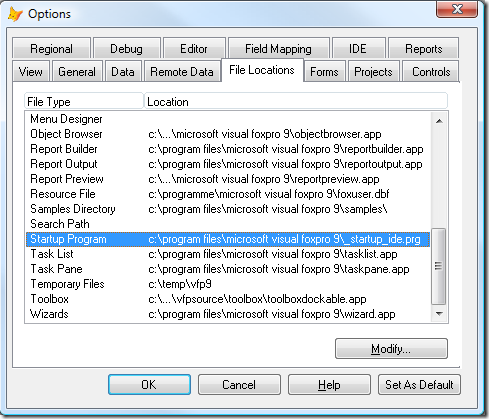
VFP's Option Dialogue has a Startup Program entry, too!

Next, you should put the DO FORM command for the Global Resource Manager launch on line #1 of your script! That’s all you have to do to make the GRM the top controlling form each time you start your VFP development environment.


Back to Top A Little Teaser

I recorded a short screen cast, showing the first alpha version of my Global Resource manager in action. What you will see are three events I have implemented so far (EvtClearAll, EvtCloseAll and EvtReleaseAll). When using the GRM you may like to bind to these events to get noticed when the user does a CLEAR ALL, a CLOSE ALL or a RELEASE ALL. The other feature is a simple way to make a form instance unbreakable by passing the form reference to an internal manager (referenced by My.UBForms) – have fun.

GRM4VFP Alpha Version 0.1

My Global Resource Manager for VFP

I highly recommend to watch the video on YouTube (in a new window) in HD!

Download Alpha Version

Download is coming soon!

Download will be enabled very soon – I just have to make some minor additions and corrections.


Previous ChapterNeat Solutions Home (TOC)Next Chapter

“Unbreakable” Objects Revisited – Final Part V

Version: 1.50.00 - last update: Tuesday, October 13, 2009, 18:40:00

Previous ChapterNeat Solutions Home (TOC)Next Chapter


This is all about how to create a CLEAR ALL resistant class to speed-up things while developing.

Intro

As I expected, part IV wasn’t the last part of this almost “never ending story” :-) Jim Nelson, lead developer of VFPX’s PEM Editor, checked my “cancelling a QueryUnload” code and wrote this message (follow the link and read the whole thread if you’re interested in, or stay here and read the quintessence).

What I missed to explain last time…

Do you know this situation? You are trying to explain some complex stuff to your audience and nobody grasps what you mean? This is, because you’ve missed to explain something basically, you’d better done before diving deep into constrained details!

Let’s talk about the details:

Any form instantiated using DO FORM (I’m going to call them DOFORM from now on) that is CANCELling the QueryUnload event keeps all following FORMS stay alive, too. With “Following FORMS” I mean all FORMS in _SCREEN.FORM[x] collection with a lower index value than the cancelling DOFORM. If you “did” your FORM like this: DO MyForm NAME (SYS(2015)) LINKED it will be released when typing a CLEAR ALL + RELEASE ALL. All FORM instances created using CREATEOBJECT() will be destroyed in any event. Thus, typing in a CLEAR ALL + RELEASE ALL in the command window will destroy all of those DOFORMS and FORMS!

Two things you should remember

1st: CANCELling a form’s QueryUnload() that was caused by a global CLEAR ALL isn’t scoped to that single form instance but applies to all “following” forms in the _SCREEN.Forms[n] collection!
2nd: VFP’s destruction sequence of FORM instances isn’t at random, but loops through the _SCREEN.FORMS[n] collection as if one wrote:
FOR lnLoop = _SCREEN.FormCount TO 1 STEP -1
    _SCREEN.Forms[m.lnLoop].Release()
NEXT

The first FORM or DOFORM that got instantiated will be on top of the _SCREEN.FORMS[n] collection – always! When VFP’s IDE starts up we have to DO a FORM with a CANCEL in its QueryUnload (of course). This first form always stays at top-position in VFP’s _SCREEN.Forms[n] collection. In other words: When this first instance of a DOFORM (stored in _SCREEN.Forms[_Screen.FormCount]) CANCELs a QueryUnload event, all other DOFORMS stay alive, too! Tools like VFP’s Toolbox and any Class-Browser instance are protected against all CLEAR ALLs then.  Best of it: We don’t have to alter any tool source code but to create some clever enhancements within a Global Resource Manager. (My next thread will be about this GRMgr!)

More Findings

Today, after some days went by, giving me enough time to explore my initial findings more thoroughly, I must admit that just CANCELling the QueryUnload of an “unLINKED” DOFORM isn’t without additional side-effects! After all observations and studies I’ve made, I can tell you so far that cancelling a CLEAR ALL in VFP’s IDE cancels the pending process steps completely! We have to read VFP’s help carefully:
<< CLEAR ALL Releases from memory all variables and arrays and the definitions of all user-defined menu bars, menus, and windows. CLEAR ALL also closes any tables, including all associated index, format and memo files, and selects work area 1. CLEAR ALL also releases from memory all external shared library functions registered with DECLARE - DLL.
CLEAR ALL does not release system variables, and does not clear the compiled program buffer. Use CLEAR PROGRAM to clear the compiled program buffer.
Issuing CLEAR ALL within an event or method for an active control or object generates a Visual FoxPro error message. An object type variable cannot be released from memory when its associated control or object is active.
>>

CLEAR ALL can be seen as a sequence of actions VFP performs internally. I found out, that releasing all forms in the _SCREEN.FORMS[n] collection is the first step VFP takes! Thus, CANCELLING the sequence just inside the topmost DOFORM lets VFP jump out of the sequence immediately! This means that neither all pending DOFORMS are released, nor any public memory gets dropped, all tables stay open, all declared DLLs remain declared and no menu is released as well! Only some form-class instances are gone.

If one tends to settle on any negative point of view, he/she/it could say >>Your CANCELling isn’t useful!<< IMHO, this isn’t true at all! I like the idea to gain full control over critical direct-commands like CLEAR ALL. Thus, I created a routine, that simulates a CLEAR ALL. But in contrast to VFP’s unspecific original CLEAR ALL, I can spice up my own, home-grown one with a lot of useful extensions! For instance, if I like to “clear all protect” some memory vars, why not create an exclusion list? Why not create such a list for every group I’m touching within this routine?

I like that!

*\\ This method executes all steps that are taken by a regular CLEAR ALL, too.
*\\ Start sequence of CLEAR ALL related commands
*\\	all variables and arrays 
RELEASE ALL EXTENDED
*// [BS]ToDo: Create an exclusion list for variables that 
*//	should stay in memory (protected memory)
*//
*\\	user-defined menus
DEACTIVATE POPUP ALL
CLEAR POPUPS
*//
*\\	user-defined menu bars
DEACTIVATE MENU ALL
CLEAR MENUS
RELEASE MENUS
*//
*\\	user-defined windows
*\\ If we wouldn't manipulate (increase) VFP's form reference count, 
*\\	CLEAR WINDOWS would break our form!! CLEAR WINDOWS is an absolute
*\\ killer-command (on windows and forms)! See THISFROM.LOAD() for more
*** CLEAR WINDOWS
*// It seems that CLEAR WINDOWS does "too much" internally - no restarting
*// seems to be possible (at least PEM Editor 4.10 doesn't)
*// IN ADDITION Recursion appears!!
*//
*\\ Next loop does a "softer" RELEASE()
*** [BS]ToDo: We still have to implement another protection algorithm
***  	  for forms and other objects that should be made "unbreakable"...
LOCAL lnLoop AS Integer
*\\ protect our own form from being released!
THIS.EnableRelease = .F.
*//
FOR lnLoop = 1 TO _SCREEN.FormCount
   TRY
	*\\ this works for toolbars, forms and windows (<< old fashioned DEFINEd ones)
		_SCREEN.Forms[1].Release()
	CATCH
		TRY
			? "Error releasing form/window/toolbar - name='" + _SCREEN.Forms[1].name + "'"
		CATCH
		ENDTRY
	ENDTRY
NEXT
*//
*\\ any tables, including all associated index, format and memo files
IF TXNLEVEL() = 0
	*\\ Although still listed and described in help file, the next three
	*\\	commands throw compiler & runtime errors!
	*CLOSE TABLES ALL
	*CLOSE INDEXES 
	*CLOSE FORMAT
	*\\ very interesting: next line works! As it seems CLOSE TABLES ALL
	*\\		only is allowed in interactive mode! (This info is missing in VFP's help!
	_SHELL = "CLOSE TABLES ALL"
	*// [BS]ToDo: Create an exclusion list for tables that should stay open!
	*//
ENDIF
*//
*\\ shared library functions registered with DECLARE - DLL.
CLEAR DLLS
*// [BS]ToDo: Create an exclusion list for DECLAREd API calls that should stay!

The listing is part of my new Global Resource Manager. Therefore, some of my comments above needs to be explained. While test-driving my “CLEAR ALL substitution” it turned out that the pretty seldom used CLEAR WINDOWS command is a real killer! My so carefully protected “unbreakable window” suddenly was gone after I typed a CLEAR WINDOWS into the command window during a test-run! Damn! What other VFP keywords else could do any harm to my “work”? Even though CLEAR WINDOWS is not often used (at least not by me), it is still there to kill all my “Cancelling-QueryUnload”-protected forms at user’s will. After a CLEAR WINDOWS command VFP doesn’t call DOFORM’s QueryUnloads first, but immediately runs their Destroys!

How to protect against such a nuke-attack?

Fortunately, I recalled an article from Christof Wollenhaupt that I read not so long ago. You can read it here (highly recommended! Go to 2nd topic "Object reference counters in VFP"). From there I downloaded the little ObjRef.FLL which has two functions: IncrementRef(object) and DecrementRef(object).

To get “full break-down protection” I now add an additional (self-)reference to my unbreakable DOFORMS on init (using IncrementRef(THISFORM)) and decrement VFP’s internal reference counter on form’s release and queryunload (using DecrementRef(THISFORM)). This was the final break through! Thank you, Christof! Now, even a CLEAR WINDOWS cannot drop my unbreakable forms any longer!

Conclusion

It cannot be done totally without help of C++, but almost. There are some very useful things realizable now. My Global Resource Manager will utilize what I found here, another tool that couldn’t exist without the technique I described so far, is my FoxEditor. Both tools behave as if they were originally made by Microsoft to be a native part of VFP’s IDE like the project manager.


Previous ChapterNeat Solutions Home (TOC)Next Chapter

A Global Resource Manager for VFP (Part I)

Version: 1.01.10 - last update: Saturday, September 26, 2009, 17:30:00

Previous ChapterNeat Solutions Home (TOC)Next Chapter


This thread is all about how to gain full design-time control over VFP’s shared/public resources (and more)! Missed any prerequisites? Follow back-link below.

Intro

At the beginning of part II of my thread OffSiteLink“Unbreakable” Objects I talked about what different tasks/responsibilities a global resource manager should have (IMHO). That’s about a year ago! Well, sometimes things evolve slowly. At that time, I defined the following list:

  • Keep track of all global variables (name and content)
  • Keep track of all loaded FLLs
  • Keep track of all assigned ONKEY etc.
  • Keep track of all of VFP’s system variables
  • Keep track of all DECLAREd Win API functions (and their aliases)
  • Keep track of any other global resource like mouse cursor, caret, states of CapsLock and others
  • Keep track of VFP’s _SYSMENU additions
  • Keep track of all DEFINEd popups, menus, windows etc. (plus their win-event bindings)
  • Keep track of all tool instances currently running (plus their entire states)
  • Keep track of all exclusive WIN event bindings (those to _VFP/_SCREEN)
  • Keep track of all table related stuff (wow, there’s a lot!)

That listing was set up seen from the perspective what kind of resources should be made CLEAR ALL resistant. To this day, I added some more perspectives which seem as important as “CLEAR ALL resistance” to me.

Shared Items

When talking about VFP’s global resources we have to think about all kinds of items that have a unique identity within VFP’s environment. Sometimes, we even have to go “one level up” also taking those singletons into account, which belong to the hosting operation system, like mouse and clipboard does.

Shared Behaviour

Beneath settings, declarations and definitions there certainly is another important group called shared behaviour. A lot of VFP’s SET commands apply to shared behaviour, providing an opportunity to alter a specific behavioural aspect. In fact, most of VFP’s SET commands are globally scoped this way, expect for those scoped to a data session (Yes! I know you know that:-). Another interesting (coz not so easily controllable) part are VFP’s system/window events that lack a native xBase-syntax implementation.

Win-Events

Since VFP 9, we are enabled to handle Win-Events without tasking complicated Win-Api calls, using VFP’s Win-Event binding. Contrary to VFP’s object-event binding, VFP’s Win-Event binding does not permit to bind to more than one delegate. Basically, this is because binding to a “WIN-Window“ overwrites the entry-point of the main message loop of the window, redirecting message execution to someone’s own delegate implementation. “Sub-classing” a WIN-Window this way cannot be chained in VFP. Thus, every running top level window like VFP’s main window (_VFP.Whnd) or the _SCREEN (_SCREEN.Whnd) we want to bind our own main message loop handler to, can be regarded as a unique resource (seen from that point of view).

Win-Api Calls

VFP application development today comes with employment of Win-Api calls, right? Just think about utilizing all the nice effects provided by GDI+! VFP’s DECLARE command superseded Foxtools’ RegFn32() call, which still is available, though. Beside the fact, that all DECLAREd Win-Api calls are released by a CLEAR ALL, they belong to our public resources, as well. VFP doesn’t maintain any internal reference counter for each defined Api call, like it does for it’s own object references! Thus, releasing a declared Api call definition is always scoped to VFP’s entire session; code in all procedures/methods will loose access to that definition, immediately after releasing it.

The Declare Stumbling Block

There is another almost unknown latent jeopardy while working with Api call ALIAS names!

Let’s review the DECLARE DLL syntax shortly:
DECLARE [cFunctionType] FunctionName IN LibraryName [AS AliasName]
I dropped the parameters portion which isn’t important at the moment. Therefore, I coloured the AS name part, that may cause you troubles if not handled the right way! Assigning an AS-Alias is a common practice to avoid name-clashes. Another reason is to create multiple declarations of the same Win-Api call using different parameter signatures. Now, look at the following code sequences that are using a simple declaration example, taken from VFP’s help file:

Scenario #1 (error-prone)
CLEAR ALL
? ADLLS(aD) && echos >>> 0, which is absolutely Okay!
DECLARE INTEGER GetActiveWindow IN WIN32API AS MyGetActiveWindow
DECLARE INTEGER GetActiveWindow IN WIN32API
? ADLLS(aD) && echos >>> 1, which should be 2!
CLEAR DLLS GetActiveWindow && or CLEAR DLLS MyGetActiveWindow
? ADLLS(aD) && echos >>> 0, which is bad, coz the 2nd DEF was dropped, too!
Scenario #2 (fail-safe – at least partial)
CLEAR ALL 
? ADLLS(aD) && echos >>> 0, which is absolutely Okay! DECLARE INTEGER GetActiveWindow IN WIN32API DECLARE INTEGER GetActiveWindow IN WIN32API AS MyGetActiveWindow ? ADLLS(aD) && echos >>> 2, that’s right now! CLEAR DLLS GetActiveWindow ? ADLLS(aD) && echos >>> 1, that’s right now! *\\ until now we are save - our aliased declaration *\\ still is active. But then: DECLARE INTEGER GetActiveWindow IN WIN32API ? ADLLS(aD) && echos >>> 1, which should be 2!

The bottom line is: If you need to declare an aliased Win-Api call for another reason than to avoid a name-clash, ALWAYS declare the un-aliased one, first! If you are sure, you can release your declaration, always release both parts! Or, maybe even better, always use aliased declarations, never use the original Win-names anywhere else but as the FunctionName parameter within the declaration itself. That approach will never lead you into troubles later on.

I’ve seen a lot of other developer’s code blocks defining a Win-Api call just before calling it. This is bad practice in terms of well behaved access to global resources! Therefore, wouldn’t it be great to have some central mechanism that would take care and control VFP’s “weird” DECLARE DLLs behaviour? Well, my Global Resource Manager will be able to do so!

Back to the thread

We learned that a global resource can be:

  • A unique object
  • A (set of) unique event(s) or routine(s)
  • Some unique behaviour.

Global resources are not limited to VFP’s environment, but may belong to the enclosing operation systems (as well). There are two different scenarios where we need access to global resources:

  • Design-time
  • Run-time

Although both are different in general, they share some common aspects:

  • At design-time, it would be very useful to have simplified access while coding classes and scripts – in other words, we need IntelliSense support. On the other hand, it would be great to have unified access to our global resources from within our tool apps we are running to facilitate our daily work.
  • At run-time, the global resources should be available by using the same building blocks we’ve created and utilized at design-time, basically. In other words, our design-time Global Resource Manager should have a set of core functions encapsulated in some base classes that can be reused in our run-time applications.
  • Design-time stresses high availability of global resources.
  • Run-time stresses high-performance access to global resources.

How to achieve that, I will show you in my next blog entry.


Previous ChapterNeat Solutions Home (TOC)Next Chapter

“Unbreakable” Objects Revisited - Final(?) Part IV

Version: 1.01.00 - last update: Saturday, September 26, 2009, 17:00:00

Previous ChapterNeat Solutions Home (TOC)Next Chapter


This is all about how to create a CLEAR ALL resistant class to speed-up things while developing.

Intro

In part three of this multi-part blog we finished our “unbreakable” form. Well, at least I thought so, now be prepared to learn something new!

In this part (IV) finally I will show you how to build a VFP form that really isn’t breakable! I am pretty sure, I am the first “VFP guy” who found out how to do that! I was very exited when I stumbled across the solution by accident. But first, let’s resume why I didn’t give up looking for the perfect way.

The solution I presented (long time ago :-) was based on storing a restart command to VFP’s _SHELL system variable. After destruction of my “unbreakable” form (and all other object hanging around) VFP examines the content of its _SHELL variable before returning control to the developer (Command window). If _SHELL is not empty, VFP executes the command stored in there and clears _SHELL after execution. Well, so far so good. What really sucks is that VFP’s _SHELL variable is a public resource! You never can be sure that your form is the only/last one which writes its “farewell letter” to the _SHELL.

Lately, I downloaded the cool new PEM-Editor from the VFPX site. It is a great tool and the guys who made it are using some restart technique after a CLEAR ALL like mine. There are other neat development tools available on VFPX, some of them are also utilizing _SHELL. What if you want to use two or more of them at the same time? Type CLEAR ALL and only the luckiest will survive - what a shame!

After a long pause (some of you may have noticed my blogging inactivity) I resumed working on some really cool tools I will make available on VFPX sooner or later. Most of my time I spend on a new source code editor for VFP. I don’t want to go into detail here only show you a screenshot of a development session.

FoxEditorDevEnv

Each editor session form is able to host up to 4 VFP editor sessions (editing the same code!) in a split screen view. Another cool thing is, that an editor sessions can be run as a dockable, a MDI, or a Top-Level form! There are millions of other smart features waiting to get implemented ;-) One thing still needs to be mentioned here: the editor areas are regular VFP editor windows. My “FoxEditorSession”- form only hosts these normal VFP editor windows (well and extends them). Typing a CLEAR ALL in the command window would have caused my running host form(s) to be destroyed. Even if I would have utilized my restarting algorithm described in part III, there would have been too many undesired side effects! Imagine you are working with, let’s say 10 open editor sessions spread all over your multi monitor desktop, all with dirty/unsaved text buffers and you have to “clear all” or “release all” – what a mess! Destroying the host forms will close the child editor window inside, too (naturally). Each VFP editor session will ask you then, if you want to store the unsaved changes! A regular VFP editor window instead just stays on screen without getting touched by any other internal memory reorganisations. That was exactly the behaviour I was searching for! I wanted to be able to create forms that behave just like VFP’s editor session windows but with a regular VFP memory handle (some m.oFormRef-variable). After all, it seemed crucial to me to create such a behaviour first, before implementing any other editor features on my list, because without a strong self-protection of the hosting form against a CLEAR ALL, all other features would have been nothing more than a bunch of futile gizmos without a comfortable home.

Yesterday I spent some hours investigating VFP-Form’s destruction behaviour. I must admit that I was doing some very strange Frankenstein experiments :-) My intention was to create a “controllable” dangling reference inside my host form, that would prevent that form instance from being closed by a CLEAR ALL. What a show! I never had so much complete VFP-crashes like yesterday evening! :-) It turned out that it was possible to go that way, but it also turned out that it was the wrong direction. I was on the verge of giving up, when I started some final test runs. I had added some new code blocks to my test form’s QueryUnload event. Unfortunately, every code block had some errors in it (replicated by copy&paste inheritance:-). I knew from countless runs before, that using the debugger’s “Fix” functionality at that point was no good idea, coz it would end up in some C5 crash caused by my handmade dangling references. On the other side I had no good mind to step through all errors that were still waiting to pop up. The buggy QueryUnload code got executed because I had typed a CLEAR ALL in the command window to initiate the destruction sequence I wanted to manipulate and monitor. At that point yesterday evening, I typed CANCEL into the command window to abort the run. And there it was: My form was still up and running/responding! I must admit, the fact that I noticed it was more or less a happenstance. Anyway, yesterday evening I was focused on all kinds of form-destruction relevant impacts and their effects. After a short time wondering why my form did not show up in the form designer but still was running, it leaped into my mind that my cancelling the form’s QueryUnload event code execution could have caused that effect.

Everybody knows, that putting a NODEFAULT into a QueryUnload prevents the form from being closed. But only if the user clicks the form’s close box or presses CTRL+F4. Some code like this could be used in your form’s QueryUnload event code:

IF MESSAGEBOX("Do you want to quit form?",;
		4+32+256,"CLEAR ALL detected!") = 7 && No
   NODEFAULT
   RETURN
ENDIF

Well, after thinking about it for a while, I gave it a try and replaced the QueryUnload event code with the following:

IF NOT THIS.ReleaseType = 2 && Close VFP
   *\\ DO NOT REMOVE CANCEL STATEMENT! 
   *\\ This is the ÜberCool trick to
*\\ make an IDE form instance
*\\ REALLY UNBREAKABLE !!!!!
CANCEL *// ENDIF

I ran my form, I typed a CLEAR ALL – my form was still there! Even its variable was accessible. I explicitly removed the variable (using something like RELEASE oMyForm in the command window) – my form was still there. Okay, latter is a normal/documented behaviour for SCX-based forms that were instantiated using something like “DO FORM myForm NAME xyz” without(!!) the LINKED keyword.

When and where does this übercool trick work?

  • You can only protect SCX-based FORM instances running within VFP’s development environment (a CLEAR ALL doesn’t make much sense in the runtime environment, right? :-)
  • You must use a SCX-based form instantiated with DO FORM, because those instances can exist without a memory reference (they are always accessible using _SCREEN.FORMS[x]).
  • You must NOT use the LINKED statement, which binds the form instance to the variable specified in NAME <varname>. CLEAR ALL destroys that variable causing an immediate destruction of your form instance (your “special” QueryUnload Event code never executes!)
  • The same is true for class based forms instantiated like so: loForm = NEWOBJECT(“MyFormClass”, “MyFormClassLibrary”).
  • BTW: The close box of such a form doesn’t work any longer, too. I already mentioned that. Best you can do is, to disable it by setting THISFORM.Closable = .F.
    Okay, you can do something else :-) You can add the following code to your QueryUnload
*\\ Code block "borrowed" from PEM Editor's 
*\\    sources >>> RestartAfterClearAll.prg
*\\ SYSMETRIC(33) := Width of a button in a half-caption window's caption or title bar
*\\ SYSMETRIC(28) := Window controls width
*\\ [BS]: this is true for dockable forms and normal child forms "IN SCREEN"
#DEFINE CloseButtonWidth ;
SYSMETRIC( IIF(VERSION(5) >= 900 AND THISFORM.DOCKABLE # 0, 33, 28)) *\\ [BS]: added calculation to reflect different [X]-button width in TopLevel Forms LOCAL lnTLF AS Integer lnTLF = IIF(THISFORM.ShowWindow = 2,13,0) IF NOT THIS.ReleaseType = 2 && Close VFP *\\ Mouse NOT over Close 'X' Button IF NOT BETWEEN ( MCOL(THISFORM.NAME, 3) ,; THISFORM.WIDTH - CloseButtonWidth – lnTLF ,; THISFORM.WIDTH ) ; AND ; MROW(THISFORM.NAME, 3) = -1 *\\ make CLEAR ALL RESISTENT CANCEL
*//
ENDIF ENDIF *\\ Maybe you like to ask the user IF NOT THIS.ReleaseType = 2 && Close VFP *\\ [BS]ToDo: Check if master editor session buffer is dirty! *\\ only in that case ask for user’s confirmation! IF MESSAGEBOX("Do you want to quit your session?",; 4+32+256,"Security Query") = 7 && No NODEFAULT RETURN ENDIF *// ENDIF

How to shut down such an unbreakable form?

Well there are many ways to do that. The easiest way is by using a special close button on your form. The click event of the button may look like this:

PROCEDURE .oBtnCloseForm.Click()
   THISFORM.TAG = "ALLOWED_TO_CLOSE"
   THISFORM.RELEASE()
ENDPROC

and your form’s release method could hold the following code fragment:

IF NOT ATC("ALLOWED_TO_CLOSE", THISFORM.TAG)
   = MESSAGEBOX("Form is in 'unbreakable' mode!",;
	0+64,"Cannot release form instance")
   NODEFAULT
   RETURN
ENDIF

Protecting your form’s RELEASE() method and/or TAG property prevents all attempts to shut down that form instance from outside!

What is so ÜberCool about that?

We do not need to access VFP’s _SHELL variable any longer! No more fighting around who’s the last _SHELL writer!
No more forms that disappear after a CLEAR ALL to reappear some seconds later (at different places:-)!

Now we all are able to create

VFP tools that LOOK AND BEHAVE as if they

were written in C++ by Microsoft’s VFP developers themselves!

Maybe you now understand why I was so exited yesterday evening! And if you are not yet, you are no thrilled VFP developer ;-))  I would like to hear from you all – I hope this trick gets spread quick and ASAP all over the VFP developer community (a hint/link to this blog’s thread would be appreciated).

Keep things rolling!

Some IMPORTANT things are still unsaid!


Previous ChapterNeat Solutions Home (TOC)Next Chapter

"Unbreakable" Objects (Part III)

Version: 1.00.01 - last update: Saturday, September 26, 2009, 16:50:00

Previous ChapterNeat Solutions Home (TOC)Next Chapter


This is all about how to create a CLEAR ALL resistant class to speed-up things while developing.

Intro

In part two of this multi-part blog we started to implement our unbreakable Form. Let's resume...

The following Start() code shows some of the more important things you should get in there. BTW: it sounds to be a good idea to implement your Start() method using some Template Pattern Design!

This is our Form’s START method code:

WITH THIS
    *\\ move the form out of the visible desktop
    .Move(0,-1000)
    *//
    IF LEFT(.cStartMode,7) == "STARTUP"
        *\\ add some _SYSMENU items to show the form
        DEFINE PAD Resources OF _MSYSMENU ;
            PROMPT "Resources" ;
            COLOR SCHEME 3 ;
            KEY ALT+R, ""
        ON PAD Resources OF _MSYSMENU ;
            ACTIVATE POPUP resources
        DEFINE POPUP resources MARGIN ;
            RELATIVE SHADOW COLOR SCHEME 4
        DEFINE BAR 1 OF resources ;
            PROMPT "Show/Hide"
        DEFINE BAR 2 OF resources PROMPT "Exit"
        ON SELECTION BAR 1 OF ;
            resources _oResource.Show()
        ON SELECTION BAR 2 OF ;
            resources _oResource.Exit()
        *//
    ENDIF
ENDWITH

By now we got our Form up and running (and moved out of sight). VFP’s _SYSMENU shows two options under the new Resources-Pad. One to show/hide the Form, the other to shut it down! Let’s have a look on the methods that get called from the menu:

This is our Form’s SHOW method code. This is far away from being perfect!

LPARAMETERS nStyle
WITH THIS
    .lhidden = NOT .lhidden
    IF .lhidden
        .Move(0,-1000)
    ELSE
        .Move(0,0)
    ENDIF
ENDWITH

Our Form’s exit method is even simpler:

THIS.lAutoReStart = .F.
THIS.Release()

We set a Form property to flag that the user really wants to shut down our form. This flag property will be queried in our Form’s destroy (see below).

Finally here is our Form’s DESTROY event code:

IF THIS.lAutoRestart
    _SHELL = "DO Form (HOME()+'RESI.SCX') " + ;
       "NAME _oResource LINKED WITH 'RESTART' NOSHOW"
ELSE
    RELEASE PAD Resources OF _MSYSMENU
    RELEASE POPUPS resources EXTENDED
    RELEASE _oResource
ENDIF

As you can see, as long as our Form’s property “lAutoRestart” is TRUE, our Form will always reappear!

Good to know

  1. There are some other things to keep in mind when working with VFP forms that way: You should disable output (THISFORM.AllowOutput = .F.), otherwise it can happen to you that interactive output is echoed to your tool form, which may resides invisible outside the VFP’s desktop just at that moment!
  2. Keep in mind that issuing a THISFORM.RELEASE() completely bypasses your form’s QueryUnload() event! This is good to know if you intend to place some Exit-button on your form letting you shut down your tool instance. Putting a THISFORM.RELEASE() in the click event of such a button never will run any code that you put in your Form’s QueryUnload() event!
  3. Another thing to keep in mind is how VFP handles clicking a Form’s close box! As you know there is a Form property called ReleaseType. You do typically query the release type of a form in the QueryUnload() event method. 0 means “Variable released”, 1 means “Close Menu Command chosen or Close Box clicked” and 3 means “Exit VFP”. As you can see there is an ambiguity with value 1. Even more than that: issuing a CLEAR ALL will set the ReleaseType value of your Form to 1, too! The best thing to do is: just disable your tool Form’s close button (THISFORM.Closable = .F.) Now you can be sure that the value of 1 was set because of a CLEAR ALL.

Final thoughts

This short demo leaves enough room for improvements! There are pretty cool things you can do this way.

What’s about your own tools that behave just like all VFP’s system tools written in C++ like the project manager? I mean, if you’re hitting in CLEAR ALL, all of your class browser instances will be gone but not your project manager instances. Wouldn't it be nice to have some unbreakable tool forms behaving just the same:-)

This is pretty easy to do: You only have to capture (and save to file) your form position and state in your form’s QueryUnload event. Afterwards lock the screen and remember this using SYS(989,1). During your form’s INIT (or LOAD) open your temporary file and position your new form instance exactly over the old place again. Finally unlock the screen (if SYS(989) returns 1) and do not forger to reset this flag using SYS(989,0). Your new form instance looks like it never has been reloaded! – Cool gadgetry

IMHO the biggest return on investment you can have is when using this system to re-configure your IDE automatically. Imagine you have declared some pretty complex WIN API calls through VFP’s command window. While testing you are messing up your development environment. After a CLEAR ALL you have at least to scroll through your command history to re-issue all those declarations. Wouldn’t it be sweet some program could do that for you?

Keep going!

Okay, there still is something more :-)


Previous ChapterNeat Solutions Home (TOC)Next Chapter

"Unbreakable" Objects (Part II)

Version: 1.00.01 - last update: Saturday, September 26, 2009, 16:40:00

Previous ChapterNeat Solutions Home (TOC)Next Chapter


This is all about how to create a CLEAR ALL resistant class to speed-up things while developing.

Intro

In part one of this multi-part blog we talked about the pieces our puzzle is made of. Finally we created a first VFP-Form that successfully refused being released. In this blog entry we’ll talk about how we can apply our findings. First of all: It is always good to have an idea of what one wants to achieve! Okay, let me tell you what I wanted to create when I was starting my development on this. I thought about the need for having something like a global resource management utility. That’s why I found the working title “Global Resource Manager” pretty well suited. Let me enumerate responsibilities some clever “Resource Manager” should be able to cover (this list is not exhaustive!)

  • Keep track of all global variables (name and content)
  • Keep track of all loaded FLLs
  • Keep track of all assigned ONKEY etc.
  • Keep track of all of VFP’s system variables
  • Keep track of all DECLAREd Win API functions (and their aliases)
  • Keep track of any other global resource like mouse cursor, caret, states of CapsLock and others
  • Keep track of VFP’s _SYSMENU additions
  • Keep track of all DEFINEd popups, menus, windows etc. (plus their win-event bindings)
  • Keep track of all tool instances currently running (plus their entire states)
  • Keep track of all exclusive WIN event bindings (those to _VFP/_SCREEN)
  • Keep track of all table related stuff (wow, there’s a lot!)

All these “Keep-track”-requirements have one thing in common: If you successfully set them up (executing some VFP code), there always is the latent chance they get killed by a simple CLEAR ALL (or some other related commands). We all know that every now and then there is no other way to escape. So there is only one thing we have to reassure: everything must get back into place afterwards automatically! How to do that is another story – back to the thread!

There is one thing you have to keep in mind! VFP’s _SHELL variable itself is a global resource! What if every vendor you’ve bought another super-cool tool from would try to utilize it for just this restarting purpose we’re just talking about? This would mean that only the last _SHELL-Writer (the luckiest) would win! Got the clue? What’s the general indicator for something called to be a “global resource” within VFP? A global resource is a singular something that is to be shared amongst many! Nobody can rely on being the only one using it!

BTW: SYS(988) and SYS(959), we’ve talked about in part one, are also accessing some global resources, don’t they?

Final Implementation

Our Form gets launched from our global startup program when VFP starts. To keep things simple our Form is stored in VFP’s HOME() directory. Our startup.prg could look like the following:

DO Form (HOME()+”RESI.SCX”) NAME _oResource LINKED WITH "START" NOSHOW 

This is our Form’s INIT event code:

LPARAMETERS tcMode AS String
WITH THIS
    *\\ check out: Is this a new VFP session?
    .lNewVFPSession = NOT SYS(988)
    *\\ finally set undocumented memory cell TRUE
    = SYS(988, .T.)
    *//
    DO CASE
        *\\ set start-mode token
        CASE PCOUNT() = 0
            .cStartMode = IIF(.lNewVFPSession,;
                        "STARTUP_VFP",;
                        "STARTUP")
        CASE NOT VARTYPE(m.tcMode) == "C"
            .cStartMode = IIF(.lNewVFPSession,;
                        "STARTUP_VFP",;
                        "")
        OTHERWISE
            .cStartMode = IIF(.lNewVFPSession,;
                        "STARTUP_VFP",;
                        UPPER(ALLTRIM(m.tcMode)))
    ENDCASE
ENDWITH
IF NOT TYPE("_oResource") == "O" OR ;
    TYPE("_oResource") == "O" AND ISNULL(_oResource)
    *\\ reassure we've got our public variable
    RELEASE _oResource
    PUBLIC _oResource
    _oResource = THIS
ENDIF
_SHELL = "_oResource.Start()"

We use SYS(988) to check if we’ve just started a new VFP session. In this case SYS(988) returns .F. (the boot default). After that we set it to TRUE, which will flag a running VFP session as long as we are working within VFP’s IDE. We could have passed the special “START_VFP” literal from within our startup.prg but that’s not bullet proof enough, coz someone might re-execute our starup.prg later in the game. There maybe some setup tasks we want to run only once while starting VFP. That’s why using a pretty unknown memory function like SYS(988) is a much more secure way to achieve that. At the end of our Form’s INIT event method we stuff a Start() command into VFP’s _SHELL. Doing so has some advantages:

  1. There might be some other code in our startup.prg we want to execute before running our Form’s Start() method.
  2. We can be sure VFP is fully initialized when getting back program control.

What you want to put into your Form’s Start() method is only limited by your imagination!


Previous ChapterNeat Solutions Home (TOC)Next Chapter